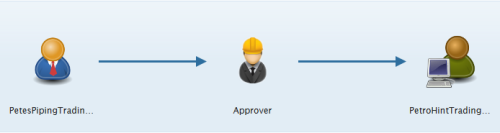
The following is an example of the Approval tab on the Invoice form:

- Your Trading Group icon
 is always displayed.
- An Approver icon

-
As an Invoice is processed, it's status will be displayed with the Approver icon: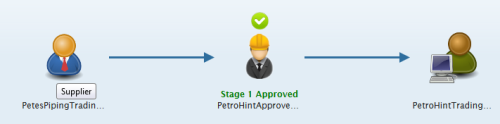
|
note |
If the Approver icon is marked with a "?" |
 , this mean
- Your Trading Partner's icon is always displayed.
|
note |
This does NOT mean that your Trading Partner is set up with Invoice Approver. To verify if Invoice Approver is active for your Trading Partner, check to see whether there is an Approver field visible under the Approver area in the Shipment tab.
If there IS an Approver field under the Approver area in the Shipment tab, an approver will either already be populated , or should be selected. |
|
note |
Situations may arise that require you to select an alternate approver. For more information, refer to Redirecting to another Approver, page 1. |
|
NOTE |
Validation requirements, status updates, workflows, and available fields and features may vary depending on your Trading Partner. For details on each Trading Partner's requirements and workflow, see their Quick Reference sheet. |